AI Content Detector API
This guide helps you easily integrate the Trinka AI Content Detector API into your applications to detect AI-generated content in an entire document and receive a downloadable PDF report that includes an overall AI/Human score and individual AI or Human scores for each paragraph.
Use Cases
Here are some of the things that AI Content Detector API can do for you:
- Detecting AI-generated text in documents
- Receiving comprehensive reports
- Visualizing AI likelihood
How to Get Started
Get an API key: You need an API key to get started. This API key is a unique identifier used to authenticate requests associated with your account for usage and billing purposes. Your API key must be included in each request. You can generate your API key by signing up on the Trinka developer portal.
Send an API request: The Trinka AI Content Detector API uses RESTful architecture, and all input and output data are in JSON format. Standard HTTP response codes and authentication are used. The content-type of both request and response must be application/json. All data must be UTF-8 encoded.
Get the results: Once the file processing is complete and the report status is SUCCESS, Trinka will provide a downloadable link to a PDF file. This PDF report includes an Overall score for the document and an AI or Human score for each paragraph. The report will also feature AI-generated text annotations and scoring.
Handle errors: Trinka uses standard codes to indicate success or problems. Refer to the appendix for more details.
API Request-Response
Please follow the given steps to upload and process a document.
Step 1: Generate a Document Submission Link (Create Token API)
Endpoint:
POST https://api-platform.trinka.ai/api/v1/ai-cd/report/create/token
Example CURL Request:
curl --location --request POST 'https://api-platform.trinka.ai/api/v1/ai-cd/report/create/token' \
 --header 'x-api-key: <<your key>>'
Output:
{
    "status": true,
    "data": {
        "message": "Successfully created submission",
        "submission_id": "61c27ccc-96db-4509-bc84-881d28e97ebf",
        "upload_url": "https://b2bapi.trinka.ai/api/v4/aicd/report/submission/61c27ccc-96db-4509-bc84-881d28e97ebf",
        "created_at": "2025-03-07T16:49:12.136489Z"
    }
}
In the response of the Create Token API, the data field contains a unique document upload URL valid for 30 seconds. You need to use this URL in the File Submission API described below.
Step 2: Upload a Document (Submit File API)
This endpoint allows uploading Microsoft Word or PDF files using the token generated in the previous step. This means you'll need to upload your manuscript in a .doc, .docx, or .pdf format for evaluation.
Endpoint:
POST https://b2bapi.trinka.ai/api/v4/aicd/report/submission/{submission_id}
Form Data:
file: The document file to be uploaded
Example CURL Request:
curl --location 'https://b2bapi.trinka.ai/api/v4/aicd/report/submission/61c27ccc-96db-4509-bc84-881d28e97ebf' \
--header 'x-api-key: <<your API Key>>' \
--form 'file=@"/D:/manuscript_4.docx"'
Output:
{
    "status": true,
    "data": {
        "file_id": "c7e56a4d-4934-4b2f-ae0e-a2e7047ede47",
        "file_name": "manuscript_4.docx",
        "file_status": "IN_PROGRESS",
        "word_count": 1093,
        "created_at": "2025-06-11T06:17:23.113807Z",
        "status": true
    }
}
Step 3: Get Document Status (Document Status API)
This endpoint allows checking the processing status of a submitted file using the file ID.
Endpoint:
GET https://api-platform.trinka.ai/api/v1/ai-cd/report/status/{file_id}
Example CURL Request:
curl --location 'https://api-platform.trinka.ai/api/v1/aicd/report/status/c7e56a4d-4934-4b2f-ae0e-a2e7047ede47' \
--header 'x-api-key: <<your key>>'
Output:
{
    "report_id": "c7e56a4d-4934-4b2f-ae0e-a2e7047ede47",
    "file_name": "manuscript_4.docx",
    "file_status": "SUCCESS",
    "word_count": 1093,
    "uploaded_at": "2025-06-11T06:17:23.113807Z",
    "process_start_time": "2025-06-11T06:17:23.399826Z",
    "process_end_time": "2025-06-11T06:18:31.709767Z",
    "file_id": "c7e56a4d-4934-4b2f-ae0e-a2e7047ede47",
    "status": true
}
Step 4: Download Processed File
This endpoint provides the final AI Content Detection Report PDF in a downloadable link for the processed file.
Endpoint:
GET https://api-platform.trinka.ai/api/v1/ai-cd/report/information/{file_id}
Example CURL Request:
curl --location 'https://api-platform.trinka.ai/api/v1/aicd/report/information/c7e56a4d-4934-4b2f-ae0e-a2e7047ede47' \
--header 'x-api-key: <<< your api key>>>'
Output: The output is a downloadable link that contains a PDF file that includes AI-generated text annotations and scoring as shown below.
Understanding the Report
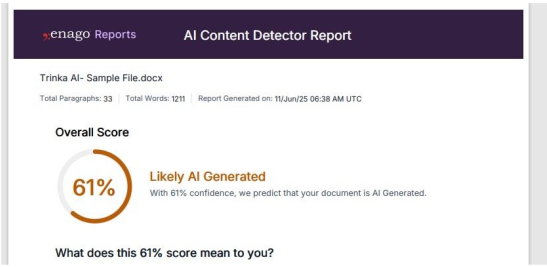
The report includes two types of scores:
-
Paragraph-level score – Confidence for each paragraph being AI-generated
-
Overall score – Confidence for the document being AI-generated
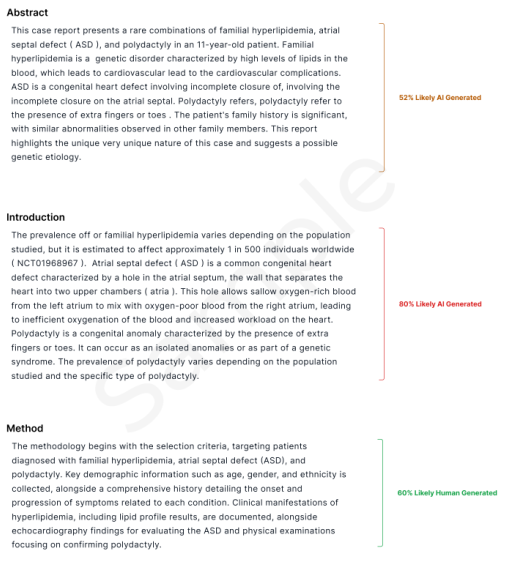 The model evaluates every word, assigning color-coded scores:
 -
Yellow (1–35%) – Low AI likelihood
-
Orange (36–70%) – Moderate AI likelihood
-
Red (71–100%) – High AI likelihood
-
Green – Human-generated text
Appendix: Trinka API Response Codes
| Code | Status | Description |
|---|---|---|
| 200 | OK | Everything worked as expected. |
| 400 | Bad request | The request was unacceptable, often due to missing a required parameter or file format not acceptable. |
| 401 | Unauthorized | No valid API key provided. |
| 403 | Forbidden | The API key doesn't have permissions to perform the request. |
| 404 | Not found | The requested resource doesn't exist |
| 500 | Server error | Trinka server issue |
For any queries feel free to connect with us at support@trinka.ai.